
Free course · HMI
FactoryTalk Optix HMI and Edge
Rockwell's new HMI platform from the first screen to the edge: Optix Studio, communication, containers and responsive design, object-oriented graphics, aliases and UDTs, faceplates and libraries, alarms, datalogger, recipes, reports, users and languages, Micro800, Modbus, Siemens and REST drivers, MQTT and OPC UA, sizing and View SE integration.
Free to learn. Verifiable certificate £19 when you pass the final exam (optional, VAT included).
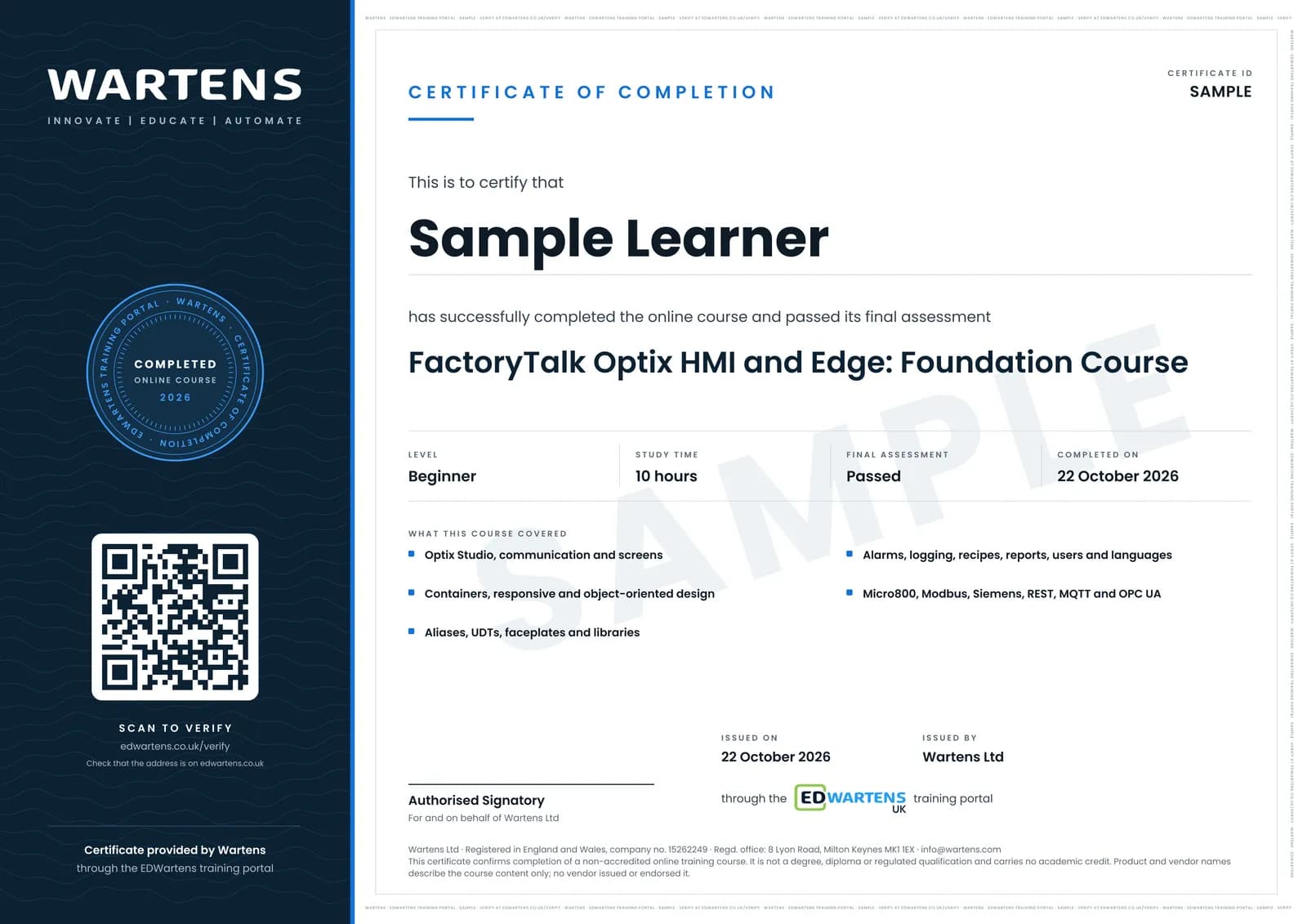
Sample certificate. Optional, issued when you pass the final exam.
- Level
- Beginner
- Modules
- 13
- Video
- 15 hours
- Price
- Free
Outcome
What you will be able to do
Build FactoryTalk Optix applications with responsive, object-oriented screens bound to Logix, Micro800, Modbus and Siemens controllers, use aliases, UDTs, faceplates and libraries, configure alarms, logging, recipes, reports, users and languages, deploy to native and web engines, and use Optix as an MQTT and OPC UA edge gateway.
- Install Optix Studio and build responsive, object-oriented screens
- Link to Logix, Micro800, Modbus and Siemens controllers
- Use aliases, UDTs, faceplates and libraries
- Configure alarms, logging, recipes, reports, users and languages
- Deploy to native and web presentation engines
- Use MQTT and OPC UA at the edge and size runtimes
Software
FactoryTalk Optix Studio (free to develop) and Logix Echo or the Micro800 simulator
Hardware
None required. An OptixPanel or PanelView Plus 7 makes deployment real.
Syllabus
13 modules
Each module has video lessons, notes and a short quiz. The final exam closes the course.
- What Optix Is and Getting the Software3 lessons
- Studio Interface, Communication and the First Screen3 lessonsLab
- Containers, Responsive Design and Object-Oriented HMI3 lessons
- Linking to a Logix Controller3 lessonsLab
- Reusable Graphics, Aliases and UDTs4 lessons
- Faceplates, Popups and Library Deployment4 lessonsLab
- Alarms, Alarm History, Trends and the Data Logger5 lessonsLab
- Recipes, Reports, ODBC and ListView5 lessonsLab
- Users, Languages and Presentation Engines4 lessons
- Other Controllers: Micro800, Modbus, Siemens and REST6 lessons
- Optix at the Edge: MQTT, OPC UA and NetLogic8 lessons
- Deploying, Sizing and View SE Integration5 lessons
- Final Assessment1 lesson
How it works
How this course works
- Watch the video lessonsOne module at a time, at your own pace.
- Take the module quizA short quiz at the end of each module shows what stuck.
- Keep your notesWrite in My notes beside each module and ask the trainer if you are stuck.
- Practise in the labOptionalTry a task from the module in the EDWartens Lab, in your browser.
- Sit the final examPass it once you have been through the modules.
- Certificate, if you want oneOptionalPaid, and only after you pass. Anyone can check it online.
EDWartens Lab
Practise this in the EDWartens Lab
Practise what makes a good HMI screen: build a plant overview with faceplates and trends, and set alarms people can act on.
Works alongside FactoryTalk Optix HMI and Edge. The Lab is process control practice in your browser: no install, no hardware, free to use. Sign in as a learner and it opens with your account.
Levels to try with this course
PRC-01 · Process lab
Read the P&ID
Open in the lab (opens in a new tab)PRC-07 · Process lab
Build an operator screen
Open in the lab (opens in a new tab)PRC-06 · Process lab
Alarm rationalisation
Open in the lab (opens in a new tab)PRC-10 · Process lab
Connect the panel to the PLC
Open in the lab (opens in a new tab)
Optional. Skip it whenever you like: it never blocks your progress or your certificate.
Why practise in a lab
Technical work is judged on what you can do: wiring, commissioning, finding a fault. Doing a task yourself teaches more than watching it a second time, and a lab lets you try it safely before you meet real equipment. It does not replace working on real hardware.
- Practise safely, so a mistake costs nothing.
- The lab checks your work like a site test, so you know when it is right.
- Free, in your browser, with nothing to install.
Certificate
An optional certificate when you pass
Learning is free. Pass the final exam and you can have a certificate for £19, including VAT, with a number employers can check online. It records that you completed a free online course; it is not a regulated qualification or a CPD certificate.
- Your name, the course, its study time and your final exam score
- A unique certificate number and a QR code to its verification page
- Issued by Wartens Ltd; add it to your LinkedIn profile in one click
- Pay now or after you pass: it is issued the moment you pass the final
Credits
Who made the lessons
The video lessons belong to their creators. EDWartens wrote the study plan, notes, quizzes and the final exam.
- Rockwell Automation
the FactoryTalk Optix getting-started and feature series
- Wayne Welk
the Optix get-started playlist
- Wayne Welk
the Optix for HMI playlist
- Wayne Welk
the Optix for edge playlist
- Wayne Welk
the Optix PLC communications playlist
- The Reynolds Company
a lesson in "Alarms, Alarm History, Trends and the Data Logger"
- ASEM S.r.l.
a lesson in "Optix at the Edge: MQTT, OPC UA and NetLogic"
- Daniel Van Dam
a lesson in "Deploying, Sizing and View SE Integration"
Questions
About this course
Is Optix replacing FactoryTalk View?
Is the software free?
Which PLCs can it talk to?
Is the course really free?
What certificate do I get, and is it a vendor qualification?
Who made the video lessons?
How long does the course take?
Want a live class and career support?
The Professional Module is five live days of Siemens PLC, HMI and SCADA with an instructor, then a resume session and a CPD certificate.