
Free course · PLC programming
Allen-Bradley Studio 5000
CompactLogix and ControlLogix from the wiring up: tags, instructions, timers, data, drives, messaging and Modbus, in Rockwell's Studio 5000.
Free to learn. Verifiable certificate £19 when you pass the final exam (optional, VAT included).
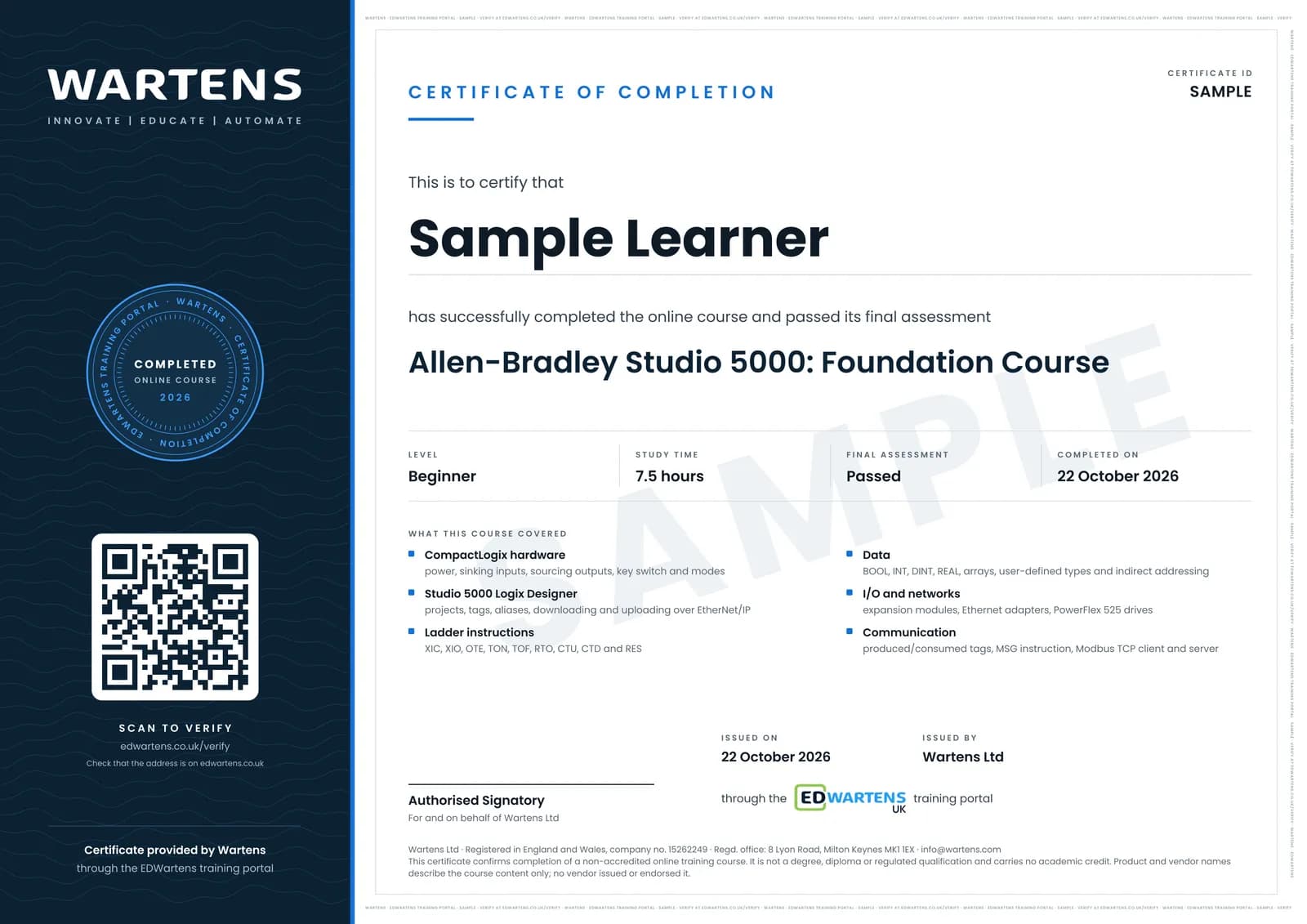
Sample certificate. Optional, issued when you pass the final exam.
- Level
- Beginner
- Modules
- 16
- Video
- 17 hours
- Price
- Free
Outcome
What you will be able to do
Install Studio 5000, wire and connect a CompactLogix, create tag-based programs with XIC, XIO, OTE, timers and counters, choose data types and arrays, use indirect addressing and produced/consumed tags, add I/O and Ethernet modules, put a PowerFlex 525 drive and a Modbus TCP device on the network, message between controllers, and clear faults when they happen.
- Wire sinking inputs and sourcing outputs to a CompactLogix without guessing
- Connect over Ethernet, download, upload, and fix RSLinx browsing problems
- Write tag-based ladder with XIC, XIO, OTE, TON, TOF, RTO, CTU and CTD
- Choose BOOL, DINT, REAL, arrays and user-defined types on purpose
- Use indirect addressing to log data without faulting the controller
- Add expansion and Ethernet modules and read the tags they create
- Run a PowerFlex 525 drive from ladder over EtherNet/IP
- Share data with produced/consumed tags, MSG and Modbus TCP, and recover from faults
Software
Studio 5000 Logix Designer and Logix Emulate are paid Rockwell software with no public trial. Use a licence from work or college, or follow the exercises in the free Connected Components Workbench; see What to download on this page
Hardware
None. Logix Emulate stands in for the controller.
Syllabus
16 modules
Each module has video lessons, notes and a short quiz. The final exam closes the course.
- Studio 5000, Logix Designer and the Logix Family2 lessons
- Wiring a CompactLogix: Sinking Inputs and Sourcing Outputs1 lesson
- Connecting Over Ethernet, Uploading and Downloading6 lessons
- The Key Switch and Controller Modes1 lesson
- Bit Instructions: XIC, XIO and OTE2 lessonsLab
- Timers: TON, TOF and RTO5 lessonsLab
- Counters: CTU and CTD1 lessonLab
- Data Types: BOOL, INT, DINT, REAL and Arrays1 lesson
- Indirect Addressing and Storing Data1 lesson
- Expansion Modules and Ethernet Modules2 lessons
- A PowerFlex 525 Drive on EtherNet/IP1 lesson
- Messaging and Produced/Consumed Tags2 lessons
- Modbus TCP: Client and Server2 lessonsLab
- High-speed Counters and a SCARA Robot2 lessons
- Faults, Firmware and Recovery3 lessons
- Final Assessment1 lesson
How it works
How this course works
- Watch the video lessonsOne module at a time, at your own pace.
- Take the module quizA short quiz at the end of each module shows what stuck.
- Keep your notesWrite in My notes beside each module and ask the trainer if you are stuck.
- Practise in the labOptionalTry a task from the module in the EDWartens Lab, in your browser.
- Sit the final examPass it once you have been through the modules.
- Certificate, if you want oneOptionalPaid, and only after you pass. Anyone can check it online.
EDWartens Lab
Practise this in the EDWartens Lab
Write and test the same ladder logic in the Lab's PLC simulator, go online and force inputs. The Lab uses a vendor-neutral editor, so brand software stays in the course.
Works alongside Allen-Bradley Studio 5000. The Lab is plc programming practice in your browser: no install, no hardware, free to use. Sign in as a learner and it opens with your account.
Levels to try with this course
PLC-01 · PLC lab
Motor start/stop with overload
Open in the lab (opens in a new tab)PLC-02 · PLC lab
Forward/reverse conveyor
Open in the lab (opens in a new tab)PLC-04 · PLC lab
Batch counter on a packing line
Open in the lab (opens in a new tab)
Optional. Skip it whenever you like: it never blocks your progress or your certificate.
Why practise in a lab
Technical work is judged on what you can do: wiring, commissioning, finding a fault. Doing a task yourself teaches more than watching it a second time, and a lab lets you try it safely before you meet real equipment. It does not replace working on real hardware.
- Practise safely, so a mistake costs nothing.
- The lab checks your work like a site test, so you know when it is right.
- Free, in your browser, with nothing to install.
Certificate
An optional certificate when you pass
Learning is free. Pass the final exam and you can have a certificate for £19, including VAT, with a number employers can check online. It records that you completed a free online course; it is not a regulated qualification or a CPD certificate.
- Your name, the course, its study time and your final exam score
- A unique certificate number and a QR code to its verification page
- Issued by Wartens Ltd; add it to your LinkedIn profile in one click
- Pay now or after you pass: it is issued the moment you pass the final
Credits
Who made the lessons
The video lessons belong to their creators. EDWartens wrote the study plan, notes, quizzes and the final exam.
- Tim Wilborne (TW Controls)
the entire Studio 5000 lesson series
Questions
About this course
Do I need Studio 5000?
Do I need a CompactLogix?
Is this RSLogix 5000 or Studio 5000?
How is this different from the RSLogix 500 course?
What computer do I need?
Is the course really free?
What certificate do I get, and is it a Rockwell qualification?
Will this course get me a job?
Want a live class and career support?
The Professional Module is five live days of Siemens PLC, HMI and SCADA with an instructor, then a resume session and a CPD certificate.