
Free course · Software and DevOps
Docker and Containers for Automation Engineers
The prerequisite under every modern edge and IIoT job: what a container actually is and why it is not a virtual machine, installing Docker, the commands you use every day, reading logs and getting a shell inside a running container, developing against containers instead of installing software by hand, writing a Dockerfile, private registries, Docker Compose for a full edge stack, volumes so plant data survives a restart, and the production practices that decide whether an image belongs on a plant machine.
Free to learn. Verifiable certificate £19 when you pass the final exam (optional, VAT included).
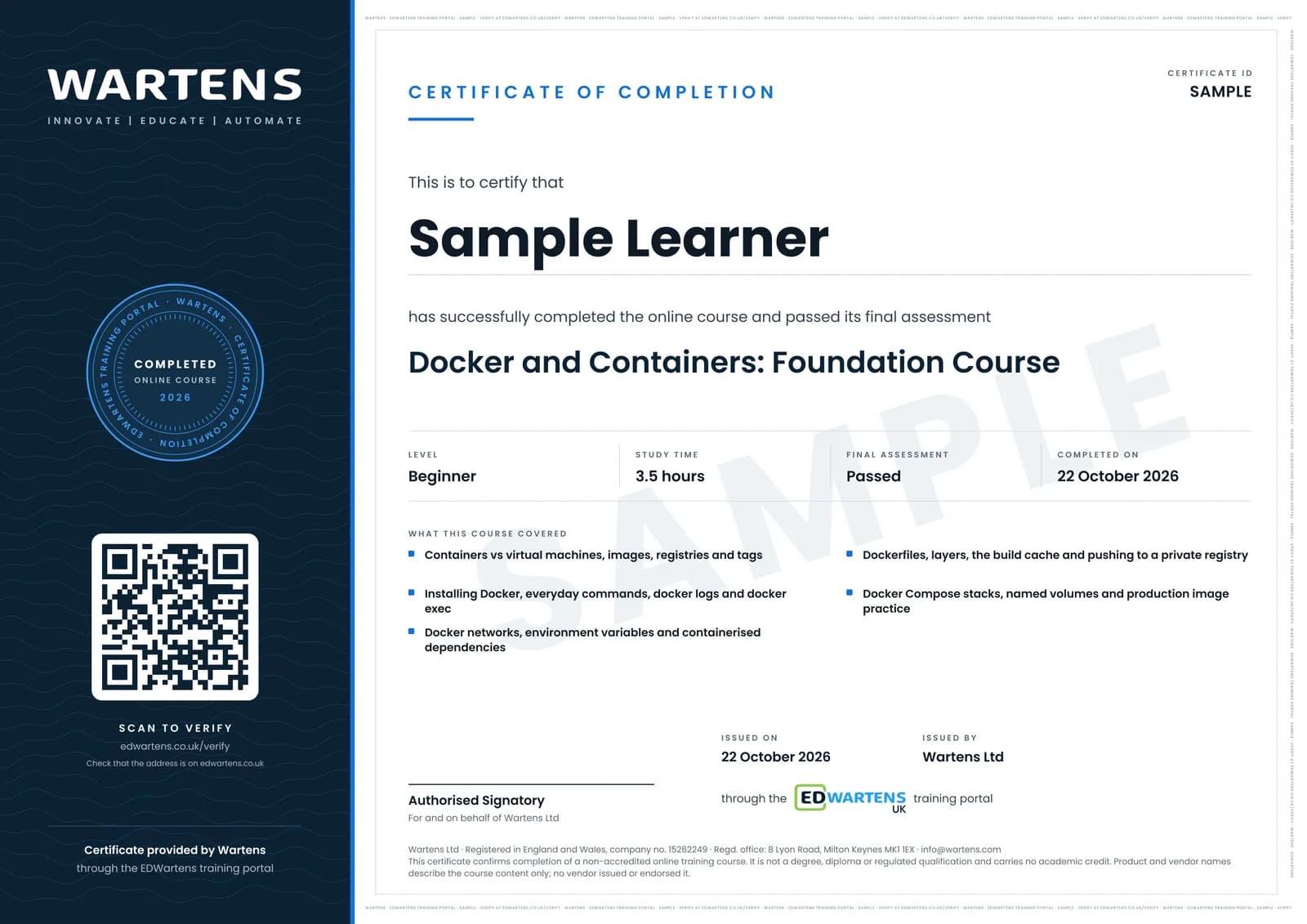
Sample certificate. Optional, issued when you pass the final exam.
- Level
- Beginner
- Modules
- 11
- Video
- 7 hours
- Price
- Free
Outcome
What you will be able to do
Run, stop, inspect and remove containers from the command line; find why a container failed using its logs and a shell inside it; replace hand-installed software with images pulled from a registry at a pinned version; write a Dockerfile that builds your own application into a versioned image; push that image to a private registry and pull it on a plant machine; bring up a multi-service stack such as an MQTT broker, a time-series database and a dashboard from one Compose file; keep data across restarts and upgrades with named volumes; and say plainly whether a site needs an orchestrator or whether Compose on one box is the better answer.
- Run, stop, inspect and remove containers from the command line without guessing
- Read a container's logs and open a shell inside it to find out why it stopped
- Write a Dockerfile that builds your own application into a versioned image
- Bring up a multi-service edge stack, broker plus database plus dashboard, from one Compose file
- Keep plant data across restarts and image upgrades using named volumes
- Push an image to a private registry and pull it on a plant machine with pull-only credentials
Software
Docker Desktop on Windows or Mac, or Docker Engine on Linux. Docker Engine is free for any use. Docker Desktop is free for personal use, education, non-commercial open source and small businesses, and larger organisations need a paid subscription. A text editor and a free Docker Hub account.
Hardware
Any laptop or industrial PC with about 8 GB of RAM and hardware virtualisation enabled. No PLC, gateway or plant hardware is required.
Syllabus
11 modules
Each module has video lessons, notes and a short quiz. The final exam closes the course.
- What a container is, and why it is not a virtual machine2 lessons
- Images, registries and the workflow you will follow2 lessons
- Installing Docker and running your first container1 lesson
- Everyday commands, and looking inside a running container2 lessons
- Developing against containers instead of installing software1 lesson
- Writing a Dockerfile and building your own image1 lesson
- Private registries: keeping your images off the public internet1 lesson
- Docker Compose: a whole stack from one file3 lessons
- Volumes: data that survives a restart2 lessons
- Production practices, and what sits above Docker2 lessons
- Final assessment0 lessons
How it works
How this course works
- Watch the video lessonsOne module at a time, at your own pace.
- Take the module quizA short quiz at the end of each module shows what stuck.
- Keep your notesWrite in My notes beside each module and ask the trainer if you are stuck.
- Sit the final examPass it once you have been through the modules.
- Certificate, if you want oneOptionalPaid, and only after you pass. Anyone can check it online.
Certificate
An optional certificate when you pass
Learning is free. Pass the final exam and you can have a certificate for £19, including VAT, with a number employers can check online. It records that you completed a free online course; it is not a regulated qualification or a CPD certificate.
- Your name, the course, its study time and your final exam score
- A unique certificate number and a QR code to its verification page
- Issued by Wartens Ltd; add it to your LinkedIn profile in one click
- Pay now or after you pass: it is issued the moment you pass the final
Credits
Who made the lessons
The video lessons belong to their creators. EDWartens wrote the study plan, notes, quizzes and the final exam.
- TechWorld with Nana
every video lesson in this course, from the Docker tutorial series and the channel's Compose, volumes and production videos: what a container is, Docker against a virtual machine, installing Docker, the eight basic commands, debugging with docker logs and docker exec, developing with containers, the Dockerfile, private registries, Docker Compose and deployment, volumes, the production best practices, and where Kubernetes and Swarm fit
Questions
About this course
Is the course really free?
What certificate do I get?
Who made the video lessons?
Is this the same as a Docker or Kubernetes certification?
Do I need to know Linux or programming?
What do I need installed, and does it cost anything?
Will this help with Node-RED, Ignition or an edge gateway?
Does the course cover Kubernetes?
Want a live class and career support?
The Professional Module is five live days of Siemens PLC, HMI and SCADA with an instructor, then a resume session and a CPD certificate.