

How to read electrical schematics: start at the supply, follow each rung left to right, and for every device ask what it is, whether it is shown open or closed at rest, and what it does to the next part of the circuit. Learn a handful of symbols and the ladder layout and a control drawing becomes much easier to follow. We trace one motor start-stop circuit below.
Checked 28 October 2026. Safety and standards facts come from the HSE pages for GS 38 and HSG85 and the IET page for BS 7671, all opened that day. We could not open IEC 60617 or BS EN 60204-1, so we quote no clause numbers, and the symbols and terminal numbers below are common conventions drawn by us: your drawing's own key is the authority.

Schematic, wiring diagram, layout: which drawing answers which question?
A set of drawings for a panel usually has three kinds of page, and each answers a different question.
| Drawing | Question it answers | Looks like |
|---|---|---|
| Schematic (circuit diagram) | How does it work? | Symbols joined by lines, laid out for logic, not for position |
| Wiring (connection) diagram | What goes to which terminal? | Terminal numbers, wire numbers, cable routes |
| Layout (general arrangement) | Where is it physically? | The panel front or back plate with devices placed to scale |
Fault-finding starts on the schematic, because it shows what should make the thing run. The wiring diagram then tells you which terminal to look at, and the layout where to find that terminal.
What symbols will you see every day, and how are contacts numbered?
Graphical symbols are standardised internationally under IEC 60617. We could not open the database (it blocks automated access), so treat the descriptions here as common practice and check the key on your drawings.
- Normally open (NO) contact: open at rest, closes when operated. Drawn as a gap with an angled blade.
- Normally closed (NC) contact: closed at rest, opens when operated. Drawn with a small hook on the blade.
- Push button: a contact with a dashed line to a pressed head. The emergency stop has a mushroom head.
- Coil: a rectangle. When it is energised the contactor or relay operates and every contact belonging to it changes state.
- Lamp: a circle with a cross.
- Overload relay contact: a thermal protection device's auxiliary contact, normally an NC contact in the control circuit.
"Normally" always means with the device unpowered and unoperated, the state drawn on the page. Most mistakes by beginners come from reading a contact as its operated state.
Contacts are commonly numbered in pairs: 11-12 for a normally closed contact, 13-14 for a normally open one, with the first digit identifying which contact set on the device. A contactor coil is usually A1 and A2, and an overload relay's NC contact is commonly 95-96. These are widely used markings, but your devices and drawing key decide.
What is the ladder layout, with its rails, rungs and cross-references?
Control schematics for machines are often drawn as a ladder. Two vertical rails carry the control supply, here +24 V on the left and 0 V on the right. Each horizontal rung is a path between them, with the switches and sensors on the left and the load (coil or lamp) on the right.
By convention the load sits on the right. Series contacts are AND (all must be closed), contacts in parallel are OR (either will do).
Rungs are numbered on the left. Under each coil, drawings commonly list where that device's contacts are used, as a cross-reference. A contact on rung 1 may be a contact of a coil on rung 7, and the cross-reference under the coil says which rungs. That is what lets you follow the logic across a 40-page set.
Because a rung is a chain of AND and OR conditions leading to an output, this is also the logic that PLC ladder programs copy. Our ladder logic programming tutorial takes the same idea into software.
How do you read a motor start-stop circuit rung by rung?
Here is our own drawing of a motor start-stop control circuit. It is the control circuit only: the contactor's main contacts and the motor are on a separate power sheet.
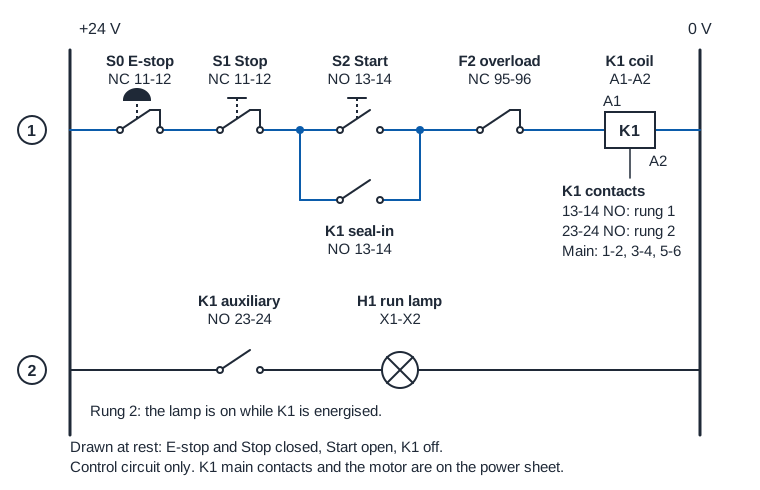
Rung 1 from left to right: S0, the emergency stop (NC, 11-12). S1, the stop button (NC, 11-12). Then S2, the start button (NO, 13-14) in parallel with K1's auxiliary contact (NO, 13-14), called the seal-in or latching contact. Then F2, the overload relay contact (NC, 95-96). Last is K1's coil, A1 to A2, joined to the 0 V rail.
Rung 2: K1's second auxiliary contact (NO, 23-24) in series with H1, a run lamp.
Cross-reference under the coil: K1 has a 13-14 contact used on rung 1, a 23-24 contact used on rung 2, and main contacts 1-2, 3-4 and 5-6 on the power sheet.
Now trace what happens, step by step:
- At rest. S0 and S1 are closed, S2 is open, K1's contacts are open. There is no complete path from +24 V to 0 V, so K1 is off, the lamp is off and the motor is stopped.
- Press Start. S2 closes. Current can flow +24 V, S0, S1, S2, F2, K1 coil, 0 V. K1 energises.
- K1 operates. Its 13-14 contact closes in parallel with S2. Its 23-24 contact closes and lights H1. Its main contacts close on the power sheet, and the motor runs.
- Release Start. S2 opens, but the path now runs through K1's own 13-14 contact, so the coil stays on. The circuit has "remembered" the start, without any memory, just a contact held closed by the coil it feeds.
- Press Stop. S1 opens, in series before the parallel block, so both the start path and the seal-in path lose the supply. K1 drops out, 13-14 opens, and releasing Stop does not restart anything.
- Emergency stop or overload. S0 does the same as S1. F2 does the same when the overload relay trips, and F2 stays open until the relay is reset. A real emergency-stop function is designed to the machine's risk assessment, and often uses safety-rated devices, so do not copy this teaching drawing for a real machine.
Stops are normally closed for a reason. A broken wire anywhere in the stop path opens the circuit, so a fault stops the motor instead of leaving it uncontrollable. A start button, by contrast, is normally open so that nothing runs by accident.
That video is from Chris Guyatt, a UK electrical instructor, and runs 22 minutes. It is a general introduction, so its symbols and layout may not match your site's drawings, and we have not checked every statement in it.
How do you get from schematic to panel?
Four labels link the pages:
- Device tags such as S0, K1, F2 and H1 are letters for the type of device plus a number. The same tag appears on the schematic, the layout and the device's label in the panel.
- Terminal numbers such as X1:3 identify a terminal strip and position on the wiring diagram.
- Wire numbers are printed on both ends of a conductor. A wire numbered the same at two terminals is the same electrical point on the schematic, even if a metre of cable separates them.
- Sheet and column references at the edge of a line say where it continues, so a line leaving a page names the next page and rung.
How do you use the drawing to fault-find?
Say the symptom is "the motor will not start". The schematic turns that into a smaller question: which series device between the +24 V rail and the coil on rung 1 is not passing, or is the coil itself the problem? A competent person works through a short list:
- Which rung and which output? The motor is driven by K1, so rung 1.
- What does the cross-reference say? K1's main contacts feed the motor, and the 13-14 contact is the seal-in. Does the motor start only while Start is held? Then the seal-in contact or its wiring is the suspect. Does K1 never pull in? Look at the series chain.
- Which device is in the chain? Here, S0, S1, S2, F2 and the coil. Has an emergency stop been left pressed or an overload relay tripped? Those are the first things the chain suggests.
- Check inputs against the drawing. Compare where the voltage is present with where it should be: the rung is a chain, so the fault lies between the last point that has voltage and the first that does not.
How that checking is done safely is a matter for training and site procedures. HSE's guidance GS 38, Electrical test equipment for use on low voltage electrical systems (fourth edition, 2015; page updated 12 September 2023) says the Electricity at Work Regulations 1989 allow few situations for live working, including testing and fault finding, and advises testing with the system dead where possible. HSG85, Electricity at work: safe working practices (third edition, 2013) covers the wider safe working practices. This article describes how drawings are used. It does not tell anyone to work on live equipment, and it does not replace training, a permit where one is needed, or a competent person.
IEC against NEMA drawings, and what UK sites use
Drawings from different regions differ in symbols, wire numbering and layout. We have not compared the standards, so we make no claim about specific rules. What we can say is practical: check the key on every set, and do not assume a drawing from another country follows the one you know. Even within the UK, older or OEM drawings may use older symbols.
For wiring, UK electrical installations follow BS 7671. The IET page says BS 7671:2018+A4:2026 (Amendment 4) is now the current edition, that BS 7671:2018+A2:2022 is obsolete and should no longer be referenced for new electrical installation work, and that the transition period for Amendment 2 ended on 15 October 2026. That is installation wiring, which is a different subject from machine control drawings. See the IET's BS 7671 page for what applies to your work.
Start free
EDWartens courses and certificates are not regulated qualifications. They are free practice material you can use to learn the language of drawings:
- The free electrical fundamentals for technicians course covers the basics behind these symbols, and wiring regulations and BS 7671 covers the installation side.
- The free PLC electrical troubleshooting course puts drawings into a fault-finding setting.
- Practise virtually in the electrical wiring simulator in the EDWartens Lab, then try the multi-skilled maintenance engineer job simulation. The first five days are free, and it is practice, not employment.
- See what employers ask for on the maintenance jobs page. We run a free job board and do not place anyone in a job.