
Free course · Project management
Microsoft Project for Planning Engineers
This free course teaches Microsoft Project desktop the way planning engineers use it on construction, MEP and plant jobs. You set up calendars and a work breakdown structure, link tasks, read the critical path, level resources, save a baseline, record progress and read earned value. ProjectLibre is shown as a free way to practise. It suits planners, project coordinators and site engineers who are asked for a programme. It supports applications for planning roles, but it cannot promise a job.
Free to learn. Verifiable certificate £19 when you pass the final exam (optional, VAT included).
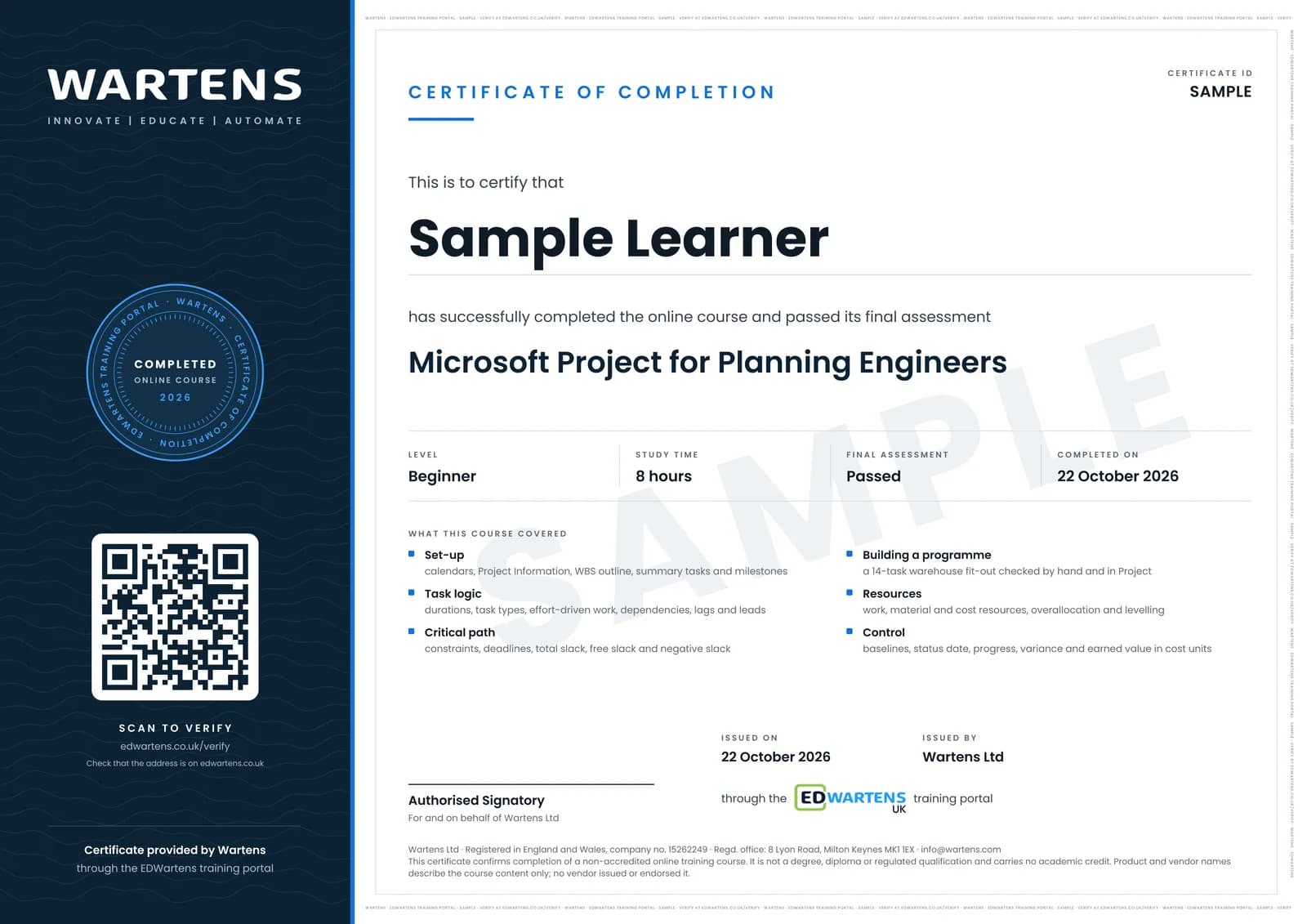
Sample certificate. Optional, issued when you pass the final exam.
- Level
- Beginner
- Modules
- 15
- Video
- 12 hours
- Price
- Free
Outcome
What you will be able to do
Set up a Project file with calendars, build a work breakdown structure, enter durations and choose task types, link tasks with lags and leads, apply constraints and deadlines with care, read the critical path and slack, assign and level resources, save a baseline and track progress to a status date, read earned value in cost units, build views, filters, custom fields and one-page reports, and hand a schedule to Primavera P6 users through XML.
- Set up a plan with calendars, a work breakdown structure, summary tasks and milestones
- Choose task types and enter durations, dependencies, lags and leads
- Use constraints and deadlines with care and audit a plan for hidden dates
- Find the critical path and calculate total, free and negative slack
- Assign work, material and cost resources and level an overloaded crew
- Save a baseline, track progress to a status date and read the variance
- Calculate planned value, earned value, SV, CV, SPI and CPI in cost units
- Build views, filters and custom fields, print reports and hand a schedule to P6 users as XML
Software
Microsoft Project desktop for Windows, as in a Planner and Project Plan 3 or Plan 5 subscription or the Project 2024 one-time edition; the scheduling steps are the same from Project 2019 on. Microsoft offers no trial of the one-time editions: the supported way to try Project before buying is a trial of Planner and Project Plan 3, whose terms Microsoft sets and changes. ProjectLibre is a free open-source option that opens .mpp files, and the notes show every step that works in it. Project for Mac does not exist; Mac users need ProjectLibre or a Windows machine. Project Online was announced to retire on 30 September 2026 and is not used.
Hardware
A Windows computer for Project desktop, or any computer that runs ProjectLibre.
Syllabus
15 modules
Each module has video lessons, notes and a short quiz. The final exam closes the course.
- Start here: the Project workspace, project information, calendars and options2 lessons
- Work breakdown structure: summary tasks, outline levels and milestones3 lessons
- Durations, task types and effort-driven scheduling2 lessons
- Dependencies: finish-to-start, lags, leads and the logic of a schedule2 lessons
- Constraints and deadlines2 lessons
- The critical path, total slack and free slack2 lessons
- A construction schedule from scratch: the warehouse fit-out2 lessons
- Resources and assignments: work, material and cost resources1 lesson
- Overallocation and resource levelling3 lessons
- Baselines, progress and the status date3 lessons
- Cost units and earned value in Project3 lessons
- Views, tables, filters, groups and custom fields3 lessons
- Reports, dashboards, printing and exporting3 lessons
- Handing a schedule to Primavera P6 users, and ProjectLibre as the free option3 lessons
- Final Assessment0 lessons
How it works
How this course works
- Watch the video lessonsOne module at a time, at your own pace.
- Take the module quizA short quiz at the end of each module shows what stuck.
- Keep your notesWrite in My notes beside each module and ask the trainer if you are stuck.
- Sit the final examPass it once you have been through the modules.
- Certificate, if you want oneOptionalPaid, and only after you pass. Anyone can check it online.
Certificate
An optional certificate when you pass
Learning is free. Pass the final exam and you can have a certificate for £19, including VAT, with a number employers can check online. It records that you completed a free online course; it is not a regulated qualification or a CPD certificate.
- Your name, the course, its study time and your final exam score
- A unique certificate number and a QR code to its verification page
- Issued by Wartens Ltd; add it to your LinkedIn profile in one click
- Pay now or after you pass: it is issued the moment you pass the final
Credits
Who made the lessons
The video lessons belong to their creators. EDWartens wrote the study plan, notes, quizzes and the final exam.
- Simon Sez IT
the Project 2019 workspace tour, summary tasks, dependencies, critical paths, constraints and deadlines, resource sharing and the report lessons
- Skills Factory
a 14-minute run through a first plan, used as the order-of-work overview
- TechnoCivil
the worked examples of fixed units, fixed duration and fixed work task types
- ITsEasyTraining1st
what the effort-driven setting does when a resource is added
- CONSTRUCTION MANAGEMENT
setting constraints and deadlines, and the short automatic levelling demonstration
- Dale Howard Microsoft Project MVP
negative slack and what causes it
- Engineering Academy
the 90-minute step-by-step construction schedule build
- Indigo Software
a Project 2024 start-to-finish plan showing the current screen
- PM Expert
resource levelling step by step, and the custom fields, tables, filters and groups tour
- Tom Stephenson
a second explanation of resource levelling and the order Project uses
- Alvin the PM - Become a Certified Project Manager
saving a baseline and updating progress
- Project-O-Metric
tracking the schedule, and planned and actual percent complete
- Prime Project Control
earned value management in Project, and the Project to Primavera P6 conversion
- EasyMSProject
finding cost and schedule variance in the Project columns
- Performance with Project
custom fields with drop-down lists
- NextGen Learning
creating a custom filter
- Project Management Solutions
converting a Project file for Primavera P6
- ACM - Administrative Controls Management, Inc
moving files in both directions between P6 and Project
Jobs
Jobs this course can lead to
The skills in this course are used in quality and project engineering work, for example as a planning engineer, a project planner and a project coordinator. No course can promise a job, and employers also look for experience, so read what live adverts ask for.
Questions
About this course
Last reviewed 1 November 2026.
Do I need to buy Microsoft Project to take it?
Is it useful if my firm uses Primavera P6?
Is the certificate a Microsoft certification?
What is the Microsoft Project for Planning Engineers course?
Who is this Microsoft Project course for?
Which version of Microsoft Project does the course use?
Can I learn Microsoft Project for free, and is there a trial?
Should I learn Microsoft Project or Primavera P6?
How long does the course take?
What jobs does Microsoft Project knowledge lead to?
Civil and structural engineer
Take it with
Want a live class and career support?
The Professional Module is five live days of Siemens PLC, HMI and SCADA with an instructor, then a resume session and a CPD certificate.