
Free course · AI and machine learning
Prompt Engineering for Engineers
This free course teaches engineers to write AI prompts with output they can check: the five-part prompt, few-shot examples, structured JSON output, step-by-step calculations you can verify, system prompts, context, and testing a prompt against a golden set. You apply it to FAT report sections, procedures, I/O descriptions and code. It suits UK engineers, technicians and technical writers who use AI assistants at work. It helps with controls, commissioning and technical authoring roles, and needs only a computer.
Prompt Engineering for Engineers is a free online beginner AI and machine learning course with 12 modules, about 13 hours of video lessons. Learning is free; an optional verifiable certificate costs £19 including VAT when you pass the final exam. Last updated 28 October 2026.
Free to learn. Verifiable certificate £19 when you pass the final exam (optional, VAT included).
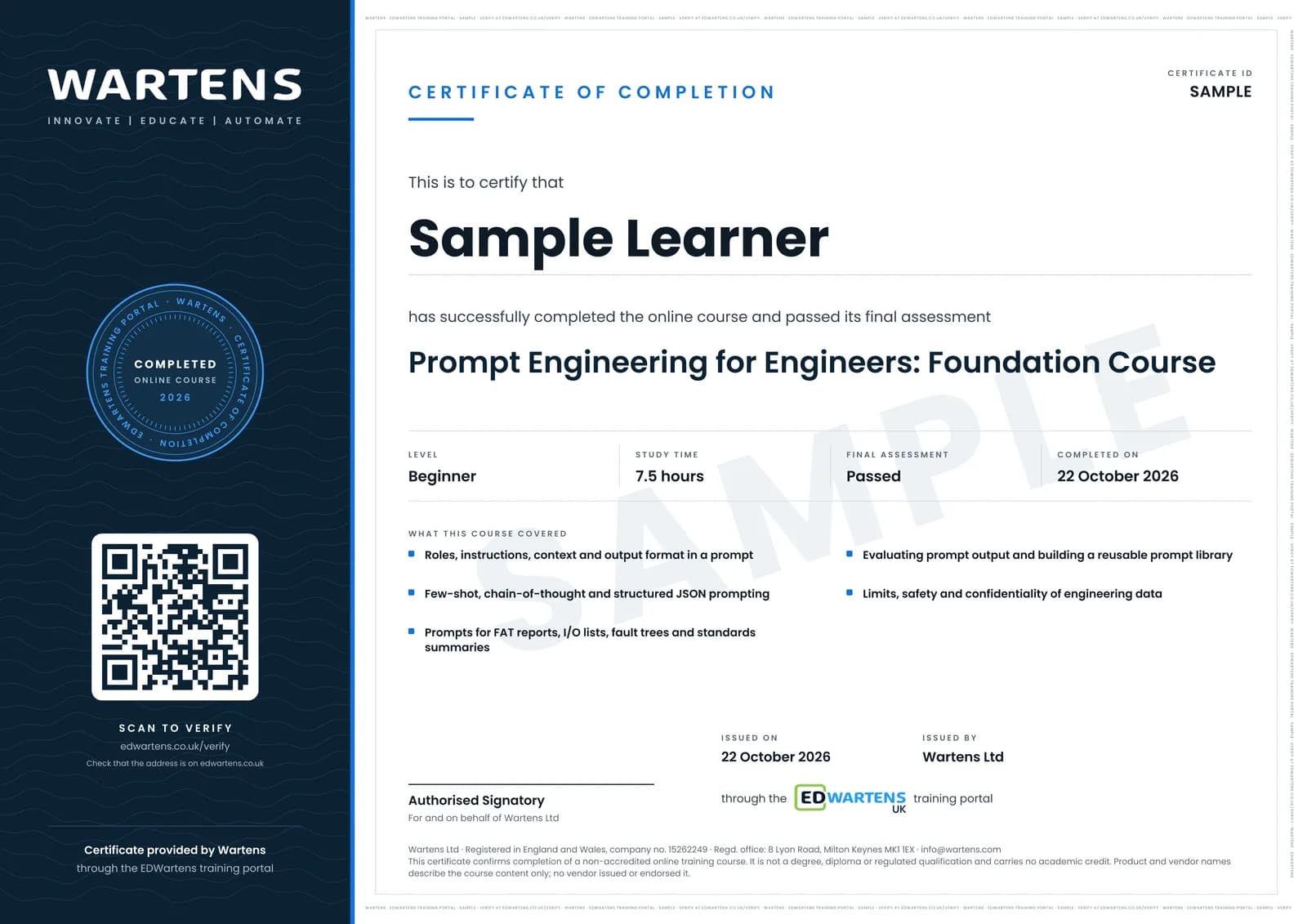
Sample certificate. Optional, issued when you pass the final exam.
- Level
- Beginner
- Modules
- 12
- Video
- 13 hours
- Price
- Free
Video time only: reading the notes, the quizzes and the final exam take extra time, at your own pace.
Outcome
What you will be able to do
Write prompts with role, task, context, format and constraints; use few-shot examples, chain of thought and decomposition; separate system and user prompts; get JSON and CSV out reliably; assemble the right context; generate engineering documents and code from data tables with rules that stop invention; use Copilot in Excel safely; and build a tested prompt library entry with a golden set and a score.
- Write a five-part prompt with a refusal rule that turns invention into a visible blank
- Fix output format with few-shot examples and get JSON with a schema at temperature 0
- Make calculations checkable with chain of thought, and run the arithmetic as code
- Generate a FAT report section, a procedure or an I/O description column from a data table without invented facts
- Prompt for code with pinned versions and run everything; use Copilot in Excel safely
- Test a prompt against a golden set, iterate to a score and write a library entry
Software
Any chat tool (ChatGPT, Claude, Gemini, Copilot) or Google Colab with a free OpenRouter key.
Hardware
None.
Syllabus
12 modules
Each module has video lessons, notes and a short quiz. The final exam closes the course.
- A prompt is a specification3 lessonsLab
- Zero-shot, one-shot and few-shot examples3 lessons
- Thinking step by step3 lessons
- System prompts and roles1 lesson
- Structured output: JSON and tables2 lessonsLab
- Context engineering2 lessonsLab
- Engineering documents from data tables1 lessonLab
- Prompting for code3 lessons
- Prompting inside Excel, Word and email2 lessons
- Evaluating prompts and the prompt library2 lessons
- Safety, confidentiality and injection2 lessonsLab
- Final assessment0 lessons
How it works
How this course works
- Watch the video lessonsOne module at a time, at your own pace.
- Take the module quizA short quiz at the end of each module shows what stuck.
- Keep your notesWrite in My notes beside each module and ask the trainer if you are stuck.
- Practise in the labOptionalTry a task from the module in the EDWartens Lab, in your browser.
- Sit the final examPass it once you have been through the modules.
- Certificate, if you want oneOptionalPaid, and only after you pass. Anyone can check it online.
EDWartens Lab
Practise this in the EDWartens Lab
Write real prompts and test them: get exact JSON for ten emails, stop the model inventing a missing fact, and defeat an instruction hidden in an email.
Works alongside Prompt Engineering for Engineers. The Lab is ai for industry practice in your browser: no install, no hardware, free to use. Sign in as a learner and it opens with your account.
Levels to try with this course
AIW-06 · AI Workbench
Prompt to spec
Open in the lab (opens in a new tab)AIW-08 · AI Workbench
A safe agent
Open in the lab (opens in a new tab)
Optional. Skip it whenever you like: it never blocks your progress or your certificate.
Why practise in a lab
Technical work is judged on what you can do: wiring, commissioning, finding a fault. Doing a task yourself teaches more than watching it a second time, and a lab lets you try it safely before you meet real equipment. It does not replace working on real hardware.
- Practise safely, so a mistake costs nothing.
- The lab checks your work like a site test, so you know when it is right.
- Free, in your browser, with nothing to install.
Certificate
An optional certificate when you pass
Learning is free. Pass the final exam and you can have a certificate for £19, including VAT, with a number employers can check online. It records that you completed a free online course; it is not a regulated qualification or a CPD certificate.
- Your name, the course, its study time and your final exam score
- A unique certificate number and a QR code to its verification page
- Issued by Wartens Ltd; add it to your LinkedIn profile in one click
- Pay now or after you pass: it is issued the moment you pass the final
Credits
Who made the lessons
The video lessons belong to their creators. EDWartens wrote the study plan, notes, quizzes and the final exam.
- Anthropic
Prompting 101, the prompt-engineering deep dive and Lesson 7
- freeCodeCamp.org
the prompt engineering tutorial
- IBM Technology
the four methods of prompt engineering and context engineering explainers
- Jeff Su
the prompt formula in eight minutes
- Tech With Tim
the prompt engineering full course and the Cursor tutorial
- Dave Ebbelaar
structured output explained
- Elvis Saravia
few-shot prompting explained
- CodeEmporium
chain-of-thought prompting explained
- Kevin Stratvert
the Copilot in Excel tutorial
- edureka!
prompt engineering for code generation and GitHub Copilot
- Simplilearn
the introduction to prompt engineering
- Analytics Vidhya
zero-, one- and few-shot prompting explained
- Telusko
structured JSON output
- Grow with Google
few-shot prompting in Google AI Essentials
- Eye on Tech
chain-of-thought prompting in three minutes
Jobs
Jobs this course can lead to
The skills in this course are used in generative AI and LLM work, for example as a controls engineer, a commissioning engineer and a technical writer. No course can promise a job, and employers also look for experience, so read what live adverts ask for.
Questions
About this course
Last reviewed 28 October 2026.
Is this enough to get a prompt engineer job in the UK?
Do I need coding skills?
Is it safe to put work documents into AI tools?
What does the Prompt Engineering for Engineers course cover?
Where does Prompt Engineering for Engineers start and where does it end?
How long is Prompt Engineering for Engineers?
Can I practise Prompt Engineering for Engineers in the browser?
Is prompt engineering still a useful skill?
How do you test whether a prompt works?
How do I stop an AI model from inventing values in engineering documents?
Is this just tips for ChatGPT?
Do I need to code?
What is the project?
Do I need a paid AI account?
Is the course really free?
What certificate do I get?
Who made the video lessons?

Want a live class and career support?
The Professional Module is five live days of Siemens PLC, HMI and SCADA with an instructor, then career sessions with our engineers and a CPD certificate.