Free course · AI and machine learning
Computer Vision with OpenCV
This free course teaches classical computer vision with OpenCV on the pictures a plant produces: parts on a belt, caps on bottles, a scratch on a surface. You measure parts in millimetres, threshold and clean images, find contours, count parts in video, and choose camera, lens and lighting. It suits UK engineers, technicians and students in manufacturing, food and packaging, and helps with machine vision, automation and quality engineer roles. A phone camera is enough.
Computer Vision with OpenCV is a free online beginner AI and machine learning course with 12 modules, about 19 hours of video lessons. Learning is free; an optional verifiable certificate costs £19 including VAT when you pass the final exam. Last updated 28 October 2026.
Free to learn. Verifiable certificate £19 when you pass the final exam (optional, VAT included).
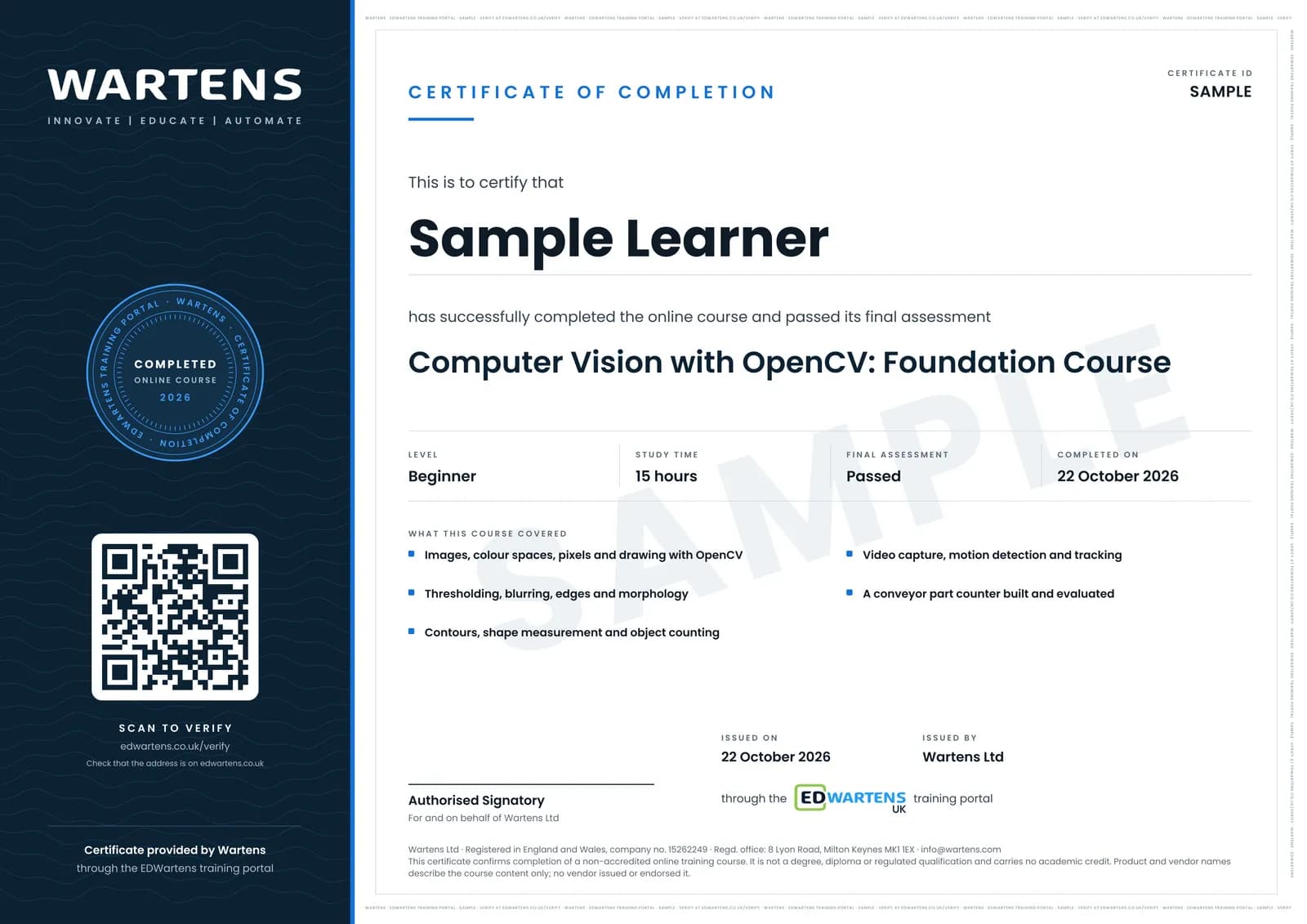
Sample certificate. Optional, issued when you pass the final exam.
- Level
- Beginner
- Modules
- 12
- Video
- 19 hours
- Price
- Free
Video time only: reading the notes, the quizzes and the final exam take extra time, at your own pace.
Outcome
What you will be able to do
Read, convert, crop and measure images in OpenCV; detect by colour in HSV; threshold and clean binary images; find edges and contours and turn them into counts and millimetre measurements; process video, subtract background and track objects across a counting line; use histograms, template matching and Hough transforms; choose cameras, lenses, lighting and triggers; and evaluate a counter against ground truth.
- Treat an image as an array and measure a part in millimetres from pixels
- Detect parts by colour in HSV and by brightness with Otsu and adaptive thresholds
- Clean binary images with morphology and separate touching parts
- Find contours and turn them into counts, sizes, shapes and pass/fail
- Process video, subtract the background and count parts crossing a line with a tracker
- Choose camera, lens, lighting and trigger so the software stays simple
Software
Google Colab (free); the first lesson shows how to check which OpenCV version you have. A phone camera for the projects.
Hardware
A phone camera, a tray and a ruler for the projects. No industrial camera needed.
Syllabus
12 modules
Each module has video lessons, notes and a short quiz. The final exam closes the course.
- An image is an array2 lessons
- Drawing, arithmetic, masks and HSV colour5 lessons
- Thresholding and morphology3 lessonsLab
- Smoothing, gradients and Canny edges3 lessons
- Contours, shapes and measurement2 lessonsLab
- Video, motion and background subtraction3 lessons
- Tracking and counting across a line2 lessons
- Histograms, template matching and Hough5 lessons
- Haar cascades, corners and the limits of classical vision3 lessonsLab
- Cameras, lenses, lighting and calibration4 lessons
- The project: a conveyor counter, evaluated2 lessons
- Final assessment0 lessons
How it works
How this course works
- Watch the video lessonsOne module at a time, at your own pace.
- Take the module quizA short quiz at the end of each module shows what stuck.
- Keep your notesWrite in My notes beside each module and ask the trainer if you are stuck.
- Practise in the labOptionalTry a task from the module in the EDWartens Lab, in your browser.
- Sit the final examPass it once you have been through the modules.
- Certificate, if you want oneOptionalPaid, and only after you pass. Anyone can check it online.
EDWartens Lab
Practise this in the EDWartens Lab
Train a model on plant data, move the decision threshold and weigh the cost of errors in the Lab's AI workbench.
Works alongside Computer Vision with OpenCV. The Lab is ai for industry practice in your browser: no install, no hardware, free to use. Sign in as a learner and it opens with your account.
Levels to try with this course
AIW-05 · AI Workbench
Vision inspection on the conveyor
Open in the lab (opens in a new tab)
Optional. Skip it whenever you like: it never blocks your progress or your certificate.
Why practise in a lab
Technical work is judged on what you can do: wiring, commissioning, finding a fault. Doing a task yourself teaches more than watching it a second time, and a lab lets you try it safely before you meet real equipment. It does not replace working on real hardware.
- Practise safely, so a mistake costs nothing.
- The lab checks your work like a site test, so you know when it is right.
- Free, in your browser, with nothing to install.
Certificate
An optional certificate when you pass
Learning is free. Pass the final exam and you can have a certificate for £19, including VAT, with a number employers can check online. It records that you completed a free online course; it is not a regulated qualification or a CPD certificate.
- Your name, the course, its study time and your final exam score
- A unique certificate number and a QR code to its verification page
- Issued by Wartens Ltd; add it to your LinkedIn profile in one click
- Pay now or after you pass: it is issued the moment you pass the final
Credits
Who made the lessons
The video lessons belong to their creators. EDWartens wrote the study plan, notes, quizzes and the final exam.
- ProgrammingKnowledge
the OpenCV Python tutorial for beginners series
- Murtaza's Workshop - Robotics and AI
Learn OpenCV in 3 hours with three projects
- freeCodeCamp.org
the OpenCV full course
- SmartVisionLights
a lesson in "Cameras, lenses, lighting and calibration"
- Nicolai Nielsen
a lesson in "Cameras, lenses, lighting and calibration"
Jobs
Jobs this course can lead to
The skills in this course are used in computer vision and machine vision work, for example as a machine vision engineer, an automation engineer and a quality engineer. No course can promise a job, and employers also look for experience, so read what live adverts ask for.
Questions
About this course
Last reviewed 28 October 2026.
Do I need an industrial camera?
Is classical OpenCV still worth learning when deep learning exists?
Is this enough to get a job in machine vision in the UK?
What does the Computer Vision with OpenCV course cover?
Where does Computer Vision with OpenCV start and where does it end?
How long is Computer Vision with OpenCV?
Can I practise Computer Vision with OpenCV in the browser?
Is this deep learning?
What are the projects?
Is the course really free?
What certificate do I get?
Who made the video lessons?
How long does the course take?

Want a live class and career support?
The Professional Module is five live days of Siemens PLC, HMI and SCADA with an instructor, then career sessions with our engineers and a CPD certificate.