Free course · CAD
Autodesk Fusion 360: 3D Design, Modelling and Manufacturing Prep
This free course teaches Autodesk Fusion 360 from scratch: sketching with constraints, extrude, revolve, loft and sweep, fillets, shells and threads, parameters, joints and assemblies, surfaces, mesh repair, sheet metal, rendering, drawings and a first CAM toolpath. It suits UK makers, apprentices, students and junior designers moving towards product design or CAD technician work. It helps with CAD technician, product designer and mechanical design roles. Autodesk offers free personal-use and education access and a trial.
Free to learn. Verifiable certificate £19 when you pass the final exam (optional, VAT included).
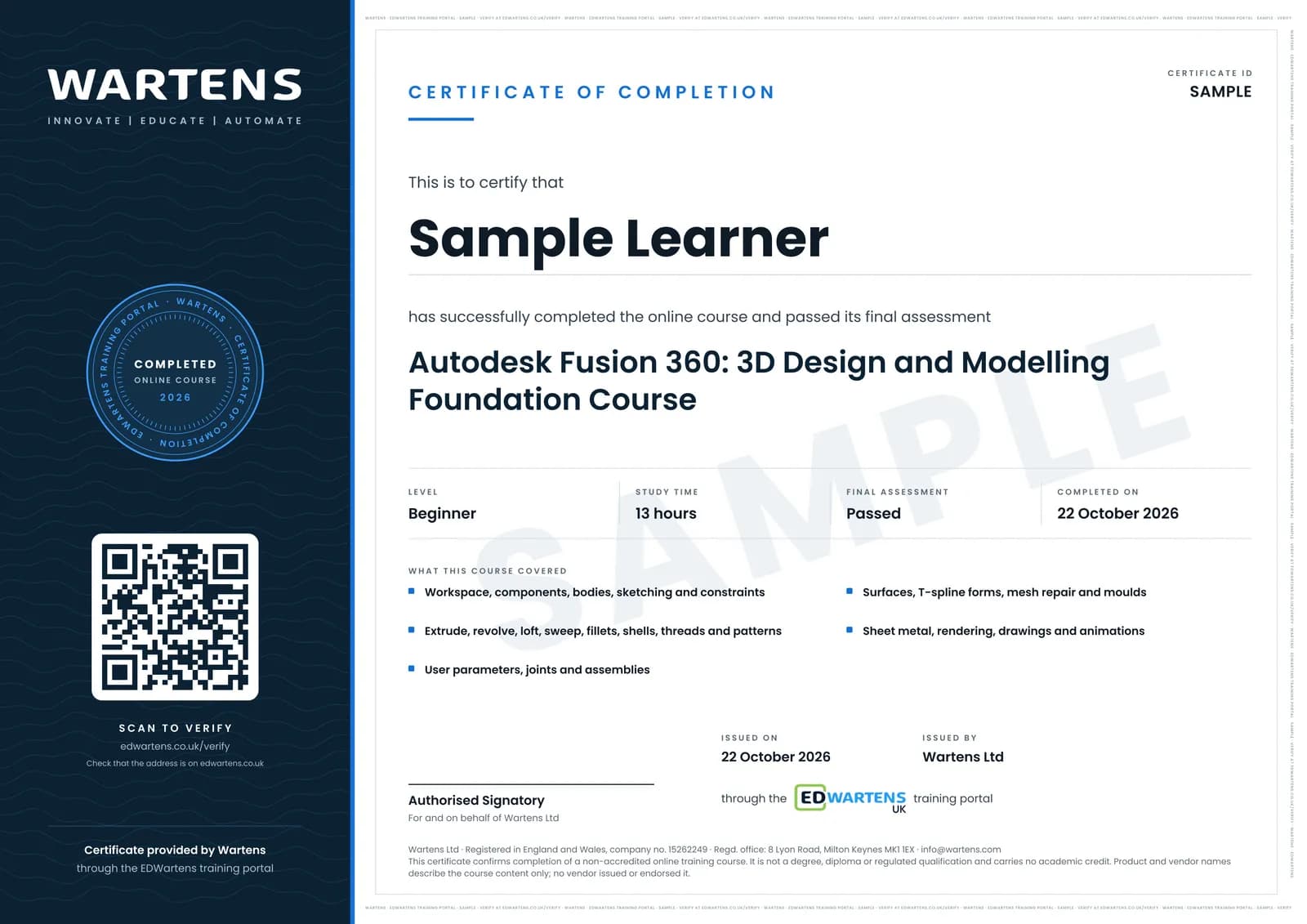
Sample certificate. Optional, issued when you pass the final exam.
- Level
- Beginner
- Modules
- 14
- Video
- 20 hours
- Price
- Free
Outcome
What you will be able to do
Sketch fully constrained profiles, model parts with extrude, revolve, loft, sweep, shell, fillet, thread and patterns, drive designs with user parameters, assemble components with joints, build organic shapes with surfaces and T-splines, repair and convert meshes, design moulds and sheet metal, and produce renders, 2D drawings and animations from a Fusion design.
- Master the Fusion workspace, components, bodies and the timeline
- Sketch with constraints and build parts with extrude, revolve, loft and sweep
- Shell, fillet, thread, pattern and parametrise designs
- Assemble components with joints and design print-in-place hinges
- Sculpt with surfaces and T-splines, repair meshes and design moulds
- Produce sheet-metal flat patterns, renders, drawings and animations
Software
Autodesk Fusion: the free personal-use licence (non-commercial), the free education licence for students and educators, or a 30-day trial
Hardware
None required. A 3D printer helps with the printing modules but is not needed.
Syllabus
14 modules
Each module has video lessons, notes and a short quiz. The final exam closes the course.
- Workspace, Terminology and the Fusion Way of Working4 lessons
- Sketching Fundamentals7 lessons
- Sketch Constraints and Sketch Tools6 lessons
- Extrude, Revolve and the First Solids6 lessons
- Modify Tools: Fillet, Chamfer, Shell, Threads, Holes, Ribs and Draft7 lessons
- Loft, Sweep and Transitions Between Shapes5 lessons
- Patterns, Text and Thin-Wall Designs4 lessons
- User Parameters, Joints and Assemblies6 lessons
- Surfaces and T-Spline Forms3 lessons
- Mesh, STL Repair, Moulds and 3D Printing5 lessons
- Sheet Metal and Multi-Part Models2 lessons
- Rendering, 2D Drawings, Plans and Animations6 lessons
- Practice Exercises and a First CAM Toolpath10 lessons
- Final Assessment1 lesson
How it works
How this course works
- Watch the video lessonsOne module at a time, at your own pace.
- Take the module quizA short quiz at the end of each module shows what stuck.
- Keep your notesWrite in My notes beside each module and ask the trainer if you are stuck.
- Sit the final examPass it once you have been through the modules.
- Certificate, if you want oneOptionalPaid, and only after you pass. Anyone can check it online.
Certificate
An optional certificate when you pass
Learning is free. Pass the final exam and you can have a certificate for £19, including VAT, with a number employers can check online. It records that you completed a free online course; it is not a regulated qualification or a CPD certificate.
- Your name, the course, its study time and your final exam score
- A unique certificate number and a QR code to its verification page
- Issued by Wartens Ltd; add it to your LinkedIn profile in one click
- Pay now or after you pass: it is issued the moment you pass the final
Credits
Who made the lessons
The video lessons belong to their creators. EDWartens wrote the study plan, notes, quizzes and the final exam.
- Product Design Online
the Learn Fusion in 30 Days series, 2026 edition
- CAD CAM Tutorials
the Fusion 360 tutorial and practice exercises for beginners
- The Fusion Essentials
the Getting Started with Fusion 360 series
- MAD' About Designs
the graded beginner practice exercises
- Autodesk Fusion
a lesson in "Practice Exercises and a First CAM Toolpath"
Jobs
Jobs this course can lead to
The skills in this course are used in mechanical design and CAD work, for example as a CAD technician and a product designer. No course can promise a job, and employers also look for experience, so read what live adverts ask for.
Pay: Mechanical engineers (SOC 2122) had a median of £52,527 a year, full-time, in April 2026. Source: ONS, Annual Survey of Hours and Earnings 2026 (provisional). Checked 28 Oct 2026.
Questions
About this course
Last reviewed 28 October 2026.
Is Fusion 360 free in the UK?
Do I need a 3D printer for the Fusion 360 course?
Will Fusion 360 skills help me get a CAD job in the UK?
Fusion or SOLIDWORKS?
Do I need a 3D printer?
Is the course really free?
What certificate do I get, and is it a vendor qualification?
Who made the video lessons?
How long does the course take?
Mechanical and product CAD
Take it with
Want a live class and career support?
The Professional Module is five live days of Siemens PLC, HMI and SCADA with an instructor, then a resume session and a CPD certificate.